
It is Tuesday night and a text comes in from a deep-clean you did Saturday. “You guys skipped the master bathroom, the baseboards still have dust.” You weren’t on that job. The crew lead swears the bathroom got done top to bottom. Now it is her word against a paying customer’s, you have zero proof, and you already know how this ends: a free re-clean across town, two hours of labor you eat, and a customer who leaves three stars anyway.
Here is the fix, and it costs you nothing but a habit. A before-and-after photo system is the cheapest insurance a cleaning business can run. The same six photos that prove the bathroom got cleaned also earn you a five-star review, rebook the customer onto a recurring plan, and stock your website with real work instead of stock images. One habit, several payoffs, plus a dispute you win every time. This is the six-stage system I set up for operators, with the exact shot list and texts you can paste in today.
Key Takeaways
- Photos are proof, not decor. A before-and-after settles a “you missed a room” dispute in ten seconds, protects you from a chargeback, and keeps crews honest. That alone pays for the habit.
- Reviews run on photos and timing. 97% of consumers read reviews for local businesses and 68% will only use one rated four stars or better (BrightLocal, 2026). A review request fired off a fresh “here is your clean” photo beats one sent cold a week later.
- The same photo rebooks the customer. An existing customer says yes to an offer 60 to 70 percent of the time versus 5 to 20 percent for a stranger (Marketing Metrics). The “your home looked great, want this every two weeks?” text works because they just saw the result.
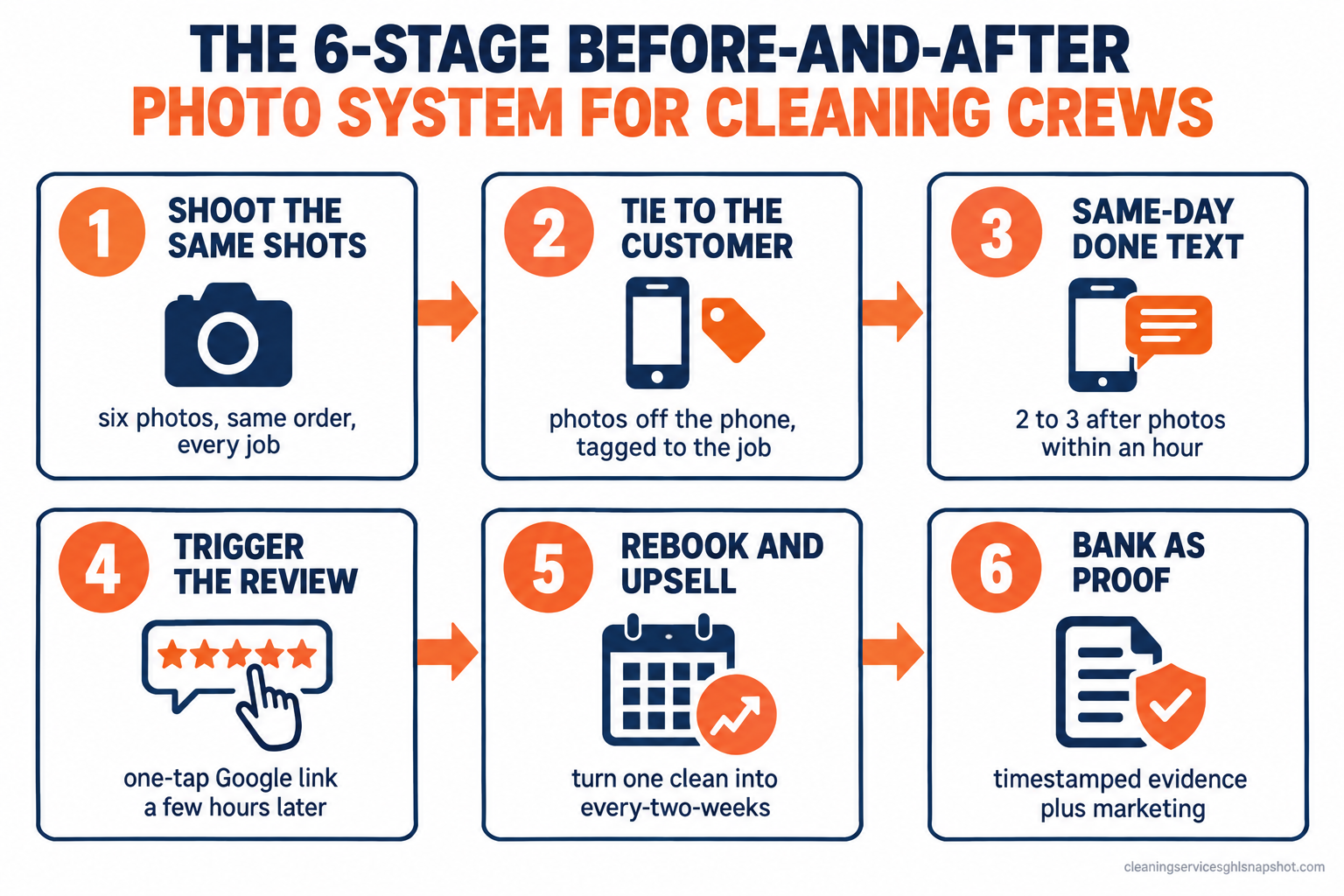
- Six stages: standardize the shots, tie them to the job, send the same-day text, trigger the review, rebook off the photo, then bank the photos as proof and marketing. Every text below is copy you can use this week.
- Mind the rules. Texting needs opt-in consent (TCPA), you cannot condition a reward on a positive review (FTC), and you need permission before you post a customer’s home.
Table of contents
- What skipping photos actually costs you
- Stage 1: Shoot the same shots on every single job
- Stage 2: Get the photos off the phone and tied to the customer
- Stage 3: The same-day “here is your clean” text
- Stage 4: Trigger the review request off the photos
- Stage 5: Use the photos to rebook and upsell
- Stage 6: Bank the photos as proof and marketing
- The same system at three sizes
- The rules you cannot skip
- The objections I hear from owners
- Frequently asked questions
- The bottom line
What skipping photos actually costs you
Start with the dispute, because that one stings. A customer claims a room got missed, and without a photo you have two bad options: argue with a paying customer, or send a crew back for free. At a May 2025 median wage of $17.07 an hour for house cleaners (U.S. Bureau of Labor Statistics), a two-hour round trip with a two-person crew is roughly $68 in labor before gas, the lost slot, and the drag on the route. Do that twice a month and you have burned over $1,600 a year settling fights you could have won with a timestamp.
Reviews are the quieter cost. 97% of consumers read reviews for local companies, and 68% will not consider one rated under four stars (BrightLocal, 2026). Freshness matters too: 74% weigh reviews from the last three months most, so if you are not asking at the right moment, you are leaving the reviews that feed your pipeline to chance.
Then there is the money already in the house. An existing customer says yes to an offer 60 to 70 percent of the time, a cold prospect 5 to 20 percent (Marketing Metrics), and keeping a customer costs 5 to 25 times less than winning a new one (Harvard Business Review, 2014). The before-and-after is the proof that makes the rebook feel obvious instead of pushy. One habit, three line items on your P&L.
Stage 1: Shoot the same shots on every single job
The system falls apart if the photos are random. One crew shoots a blurry countertop, another shoots nothing, and you end up with a camera roll you cannot use. The fix is a fixed shot list that is the same on every job, so the before and after actually line up.
Keep it short enough that a tired crew will do it. Six shots, same order, every time.
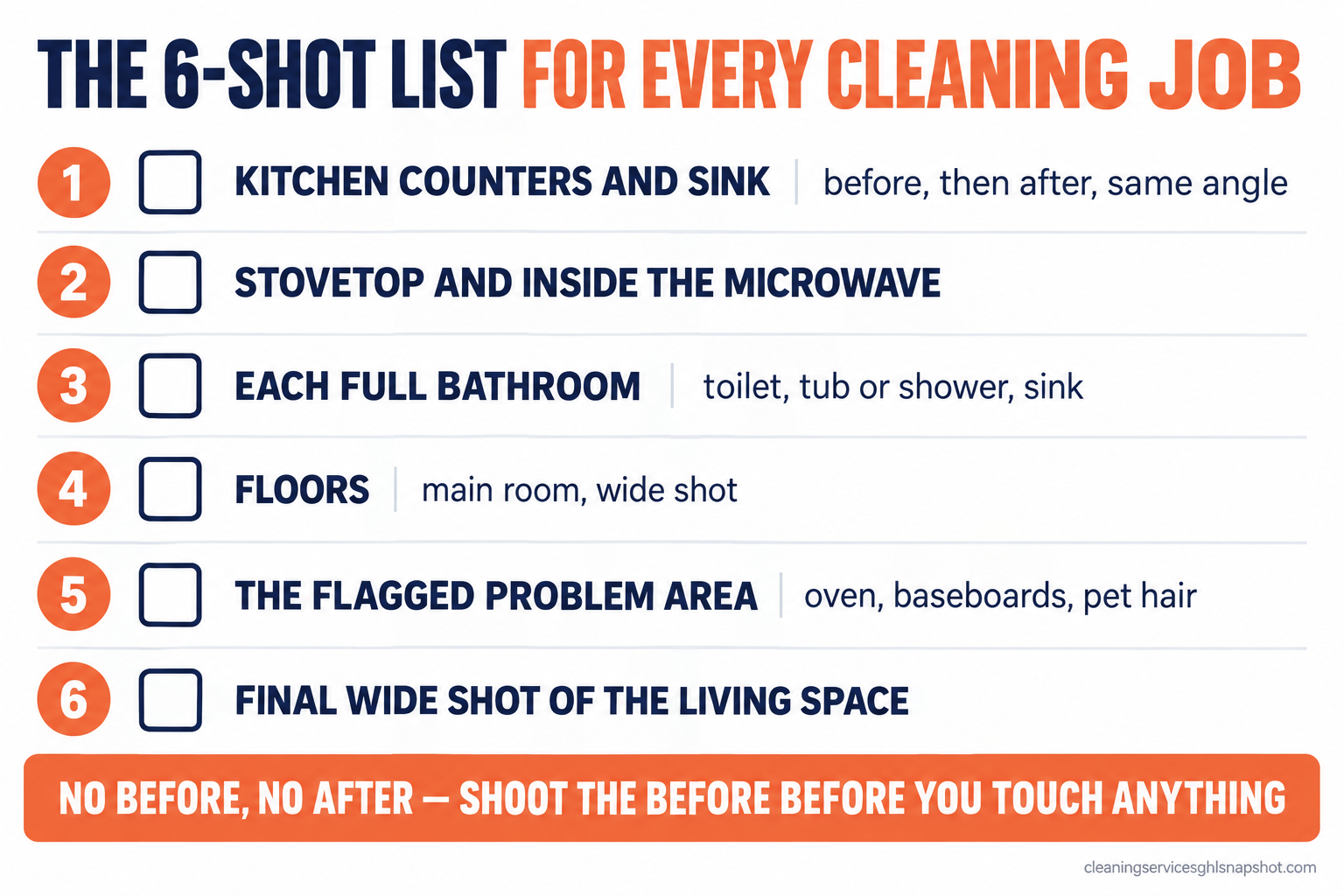
The matching angle is what sells it. A before-and-after only lands when the two shots are framed the same way, so teach crews to stand in the same doorway for both. For the problem area, the customer told you what they cared about when they booked, so that shot proves you listened.
How this breaks, and the fix. The classic failure is forgetting the “before” and only remembering once the room is spotless. You cannot fake a before, so build it into the first thirty seconds: walk in, shoot the six befores, then start. The second failure is bad lighting that makes a clean room look dingy, so flip on every light and open the blinds first. The third is the forty-photo dump nobody will ever sort. Six shots, named rooms, done.
Stage 2: Get the photos off the phone and tied to the customer
A photo stuck on a crew member’s personal phone is worthless to you. When that person quits, and in this business they do, the photos walk out the door. Worse, a photo with no name attached cannot prove anything, because you cannot tie it to the job, the date, or the customer disputing.
So stage two is plumbing: every photo lands in one place, tagged to the right customer and job. You have three honest options by size. A shared cloud folder per customer works for a solo operator. A field-service app that attaches photos to the job record works for a growing team. A proper workflow in GoHighLevel ties the photos to the contact, the appointment, and the follow-up texts in one place, which is what makes stages three through six automatic instead of manual.
Two things are non-negotiable whatever you pick. The photo has to carry a timestamp, because an untimed photo proves nothing in a dispute. And it has to be linked to the customer’s record, not floating in a group chat.
How this breaks, and the fix. The number one leak is the crew group text, where photos get buried under “running late” messages within a day. Kill it as a storage method. The second is privacy sloppiness, crews leaving the camera roll synced to a personal iCloud with a customer’s home visible to anyone who picks up that phone. Use a work account or an app. The third is photos living somewhere only one office person can find, so when a dispute hits on their day off, nobody can pull the proof. One shared, searchable place fixes all three.
Stage 3: The same-day “here is your clean” text
This stage turns a chore into something the customer remembers. The clean is done, the crew is pulling out of the driveway, and the customer gets a short text with two or three of the best after photos. It tells them the job is finished, shows off the work, and quietly sets up the review and the rebook that come next.
Timing is everything. Send it within an hour of finishing, while the customer is about to walk into a clean home. A text that lands three days later is just noise.
How this breaks, and the fix. First, sending too many photos. Nobody opens a text with twenty attachments, and it reads as desperate. Three, max. Second, sending it late, which kills the effect. Automate the send so it fires when the crew marks the job complete, not whenever the office gets to it. Third, and this one gets owners in trouble, texting a customer who never agreed to texts. You need consent first, covered in the rules you cannot skip and in our full TCPA guide for cleaners.
Stage 4: Trigger the review request off the photos
Here is the mistake almost everyone makes: they send the review request cold, days later, as a standalone “please review us” text that feels like homework. The photo system lets you do it the smart way. The customer just got the done text, walked into a clean home, and feels good about you. That is the moment to ask, and the ask rides on the warmth the photo created.
Wait a few hours after the done text, long enough for them to see the home, then send a single, specific request with a one-tap link straight to your Google review page.
Two details make this work. The link goes straight to the review form, not your homepage, because every extra tap loses people. And you ask whether the clean was great, not whether they will leave five stars, because conditioning the ask on a positive rating is against the rules now. Fresh reviews matter: 74% of consumers weigh recent reviews most heavily, and answer every review you get, because 80% are more likely to pick a business that responds (BrightLocal, 2026). Our breakdown of how to get more Google reviews goes deeper on the response side.
Share of consumers, 2026. Source: BrightLocal Local Consumer Review Survey, 2026. Figures are from separate survey questions and are not additive.
How this breaks, and the fix. First, asking too early, before the customer has seen the home, which gets you an ignored text or a lukewarm review. Wait for them to experience the clean. Second, “review gating,” screening for happy customers and steering the unhappy ones away from Google. That is now illegal under the FTC rule (below), so ask everyone the same way. Third, pointing the link at your website instead of the review form, which loses most people in the extra clicks. Deep-link straight to the form.
Stage 5: Use the photos to rebook and upsell
A one-time clean is a lead you already paid to acquire. The recurring plan is where the money actually is, and the photos are your best closer. The customer just saw the result and felt the difference. That is the window to turn one clean into every-other-week revenue, the whole point of a recurring-revenue engine.
For a one-time or move-out job, the rebook text goes out a day or two later, after the glow has set in but before the memory fades.
Notice what the text does. It references the specific job, names a concrete price and cadence, offers the same crew (people rebook crews they trust), and asks for a one-word yes. For existing recurring customers, the photo of a spotless oven is also your opening to offer an add-on next visit, the kind of upsell that lifts your average ticket without finding a single new customer. It is also the quiet fix for the customers who vanish after one visit, a pattern we dug into in why cleaning clients ghost after one visit.
How this breaks, and the fix. First, pushing recurring too hard, too fast, which makes a happy customer defensive. One clean offer, one follow-up, then let it rest. Second, a vague ask like “let us know if you want us back,” which never converts because it puts the work on the customer. Name the price, the cadence, and the slot, and ask for a yes. Third, waiting too long, so the result fades. Inside a couple of days or not at all.
Stage 6: Bank the photos as proof and marketing
The photos have done three jobs already. The last stage is keeping them, because a stored, timestamped before-and-after is an asset that keeps paying.
The first payoff is protection. When a customer disputes the work, or files a chargeback with their card company, your timestamped before-and-after is the evidence that settles it. A card dispute without documentation is a coin flip you usually lose. The same photos win it. Keep every job’s photos for at least a few months, longer for commercial accounts.
The second payoff is marketing that does not look like marketing. 36% of consumers say a photo or video alongside a review sways their choice (BrightLocal, 2026), and real before-and-afters beat stock photos because people can tell the difference. Your best shots become your website gallery, your Google Business Profile photos, your social posts, and the proof inside your quotes.
How this breaks, and the fix. First, deleting photos to save phone space, right before you need one for a dispute. Automate the backup so photos survive a wiped phone. Second, posting a customer’s home online without asking, which is a privacy and trust problem. Get permission first, every time (the exact ask is below). Third, letting the best shots rot in a folder nobody opens. Put a standing fifteen-minute slot on someone’s calendar each month to pull the five best before-and-afters into your marketing.
The same system at three sizes
The six stages do not change. What changes is the tooling, and trying to run a fourteen-crew operation on the setup a solo operator uses is where it breaks.
The photo system by operation size
| Plan | Solo / 1-2 crews | Growing / 3-15 crews recommended | Commercial / 15-50+ crews |
|---|---|---|---|
| Price | Phone + one folder | Shared system + automation | QA + client portal |
| Feature 1 | Six-shot list taped in the van | Photos attach to the job record automatically | Inspection-grade photos per area, per contract |
| Feature 2 | One shared cloud folder per customer | Done text and review ask fire on job-complete | Night-crew photos reviewed by a QA lead |
| Feature 3 | You send the done text and review ask by hand | Rebook text automated 1-2 days out | Client portal: property managers see proof |
| Feature 4 | Rebook from a simple weekly list | No photos, no closed job | Photos tied to SLA and bid compliance |
| Feature 5 | Keep photos 3 months for disputes | Best shots pulled to marketing monthly | Longer retention for contract disputes |
For the solo operator, the enemy is overhead. Keep it to a phone, a shot list, and one folder per customer, and send the texts yourself. The habit is what matters, not full automation.
For the growing residential team, the enemy is inconsistency across crews. This is where you automate: the done text and review ask fire the moment a crew marks the job complete, and “no photos uploaded” means the job does not close. That one rule fixes crew compliance faster than any lecture.
For the commercial and janitorial operator, a before-and-after of a mopped lobby is less dramatic, so the photos serve inspection and contract compliance instead. Night crews document each area, a QA lead reviews in the morning, and property managers see proof in a portal. On a bid-based contract, timestamped inspection photos are how you defend an SLA and keep the account at renewal. If contracts are your game, pair this with how to win commercial cleaning contracts.
The rules you cannot skip
Photos touch three sets of rules. None are hard to follow, but getting them wrong is expensive.
Texting consent (TCPA and 10DLC). The done text, review ask, and rebook all go out by SMS, and under the FCC’s texting rules you need the customer’s prior express consent plus a clear opt-out like “Reply STOP.” If you send through a platform, your campaign also needs 10DLC registration or your messages get filtered into the void. Collect consent at booking, keep a record of it, and honor STOP instantly. The full version is in our TCPA and 10DLC guide for cleaners.
Review rules (FTC). As of October 21, 2024, the FTC’s rule on fake reviews bans conditioning an incentive on the sentiment of a review and bans suppressing honest negative reviews. In plain terms: do not offer a discount “for a five-star review,” and do not screen customers so only the happy ones reach Google. Ask everyone the same way and respond to the bad reviews professionally.
Photo privacy. A customer’s home is private. Before you post their before-and-after anywhere public, you need their permission.
The objections I hear from owners
“My crews will never actually do this.” They will if it is six shots, not a photo essay, and if the job does not close without them. Compliance follows the rule you enforce, not the one you hope for. Make “no photos, no closed job” the standard and it becomes muscle memory inside two weeks.
“Won’t customers find the texts annoying?” Not if you send three, spaced right, and make them useful. A same-day text with photos of their clean home is a service, not spam. The annoying version is five generic “please review us” blasts with no photos and no timing. Do the opposite.
“Isn’t this just more work for no payoff?” It is about ninety seconds of shooting per job, and it replaces work you already do badly: arguing over disputes, chasing reviews, begging for rebooks. It nets out as less work, with a higher close rate on the stuff that pays.
“Do I need special software?” No, a solo operator runs it on a phone and a folder. Software earns its place once you have multiple crews and want the texts to fire automatically and the photos to attach themselves to the right customer. That is the point where doing it by hand drops balls, which is when a done-for-you workflow pays for itself.
“My work is commercial, before-and-after photos aren’t dramatic.” True, a clean office floor is not a viral post. For you the photos are inspection and contract proof, not marketing. Timestamped shots of every area protect the account at renewal and settle any “it wasn’t done” claim with a property manager. Same system, different payoff.
Frequently asked questions
How many before-and-after photos should a cleaning crew take per job?
Six is the sweet spot: kitchen, stovetop and microwave, each bathroom, floors, the customer's flagged problem area, and a final wide shot. Shoot the before the moment you walk in and the after from the same angle. Fewer and you miss disputes; more and crews stop doing it.
When should I send the review request after a clean?
A few hours after the same-day 'here is your clean' text, once the customer has actually walked into the clean home. Asking before they have seen the result gets you ignored or a lukewarm review. Send one specific request with a one-tap link straight to your Google review form.
Is it legal to offer a discount for a review?
You can offer an incentive for leaving a review, but as of the FTC's October 2024 rule you cannot condition that incentive on the review being positive. 'Discount for a review' is risky; 'discount for a five-star review' is prohibited. Ask everyone the same way and never suppress honest negative reviews.
Do I need the customer's permission to post their before-and-after photos?
Yes. A customer's home is private, so get explicit permission before posting any photo publicly, and keep the address and personal details out of the shot. A one-line text asking if you can use the rooms (not the address) on your site and social is enough, as long as you honor a no.
How do before-and-after photos help with chargebacks and disputes?
A timestamped before-and-after proves what you did and when. When a customer claims a room was skipped, or files a card dispute, that documentation settles it fast. A dispute with no evidence is usually a loss; the same dispute with photos is usually a win. Keep job photos at least a few months.
What's the best way to store cleaning photos so they don't get lost?
One shared, searchable place tied to the customer, never a crew member's personal phone or a group text. A solo operator can use a cloud folder per customer; a multi-crew team should attach photos to the job record in a field app or GoHighLevel so they survive staff turnover and are findable when a dispute hits.
The bottom line
Back to that Tuesday-night text. In the photo version, you do not call the crew and hope. You open the customer’s record, pull up Saturday’s timestamped after shot of a spotless master bathroom, and text it over: “Here’s the bathroom right after we finished at 2:14pm, let me know if something came up since then.” The dispute ends in ten seconds, you keep your two hours of labor, and the customer, who now sees you run a tight operation, is the one who feels sheepish.
That is one photo doing one job. The system is that same photo doing five: proving the work, delighting the customer, earning the review, rebooking the clean, and stocking your marketing. Six shots per job and a handful of texts that mostly send themselves, and there is no cheaper upgrade you can make to a cleaning business this week. Build the habit first on a phone and a folder, automate it when the volume makes doing it by hand drop balls, and start shooting the before on your next job, because you cannot fake it once the room is already clean.